A client asks on Monday morning why one of its most profitable brands gets almost no Google budget. Answering properly takes a Google Ads export, a GA4 report, the product feed, a stock file and a spreadsheet to join them. Many agency specialists already do part of that work in ChatGPT or Claude, some with Google Ads connected to the assistant. Even then, the assistant sees how the ads performed, but usually not what the client knows: stock levels, product costs, return rates and the ranges the business wants to grow this month.
Expanly MCP brings the retailer's commercial strategy into the advertising work. It connects Claude, ChatGPT or Microsoft 365 Copilot to the retailer's data in Expanly and to the priority rules behind its Google Shopping and Performance Max campaigns. The assistant answers with the client's own numbers, and the answer can become a rule draft that the specialist can review before it is published. Expanly MCP is in preview with selected customers, a small group of agencies and retailers.
What Expanly MCP Is
MCP, the Model Context Protocol, is an open standard for connecting AI assistants to the tools and data people already use. Expanly MCP is the MCP server for Expanly, the Control Layer for Retail Growth. Once an organization owner turns on AI access, a user connects Claude or ChatGPT to the Expanly MCP server, signs in with their Expanly account and works with the same workspaces, data and rules they see in Expanly. In Microsoft 365 Copilot, an IT administrator adds the connection.
Through that connection, the assistant can read product-level Google Ads results and GA4 sales, along with product data such as brand, category, availability and stock. When the retailer sends product costs, margins or return rates to Expanly, the assistant can read those too. It can list the current priority rules, preview a new rule against today's catalog, save drafts, change the rule order and check whether the latest daily run finished.
Expanly AI Connector is the product name for this connection, and Expanly MCP is its technical name and the name used in our Terms of Service. Retail teams and their agencies use it from the assistant they already work in, asking business questions in plain language and getting answers from the retailer's own data.
Expanly MCP and a Google Ads MCP: What Each One Sees
If you have already connected Google Ads to Claude or ChatGPT, through an MCP server or another connector, the assistant can read campaigns, products and their results as Google Ads reports them. Expanly MCP works alongside that connection and adds the retailer's side: stock levels, the rules behind each product's priority and, when the retailer sends them to Expanly, product costs and return rates. In Expanly these sit on the same products as the ad spend and the GA4 sales.
The difference shows when both get the same question.
You: Which products deserve more spend this week?
Assistant with Google Ads only: These five products have the best ROAS over the last 30 days and the most conversions per euro, so they are the first candidates for more spend.
Assistant with Expanly MCP: The same five lead on ROAS, but two of them are almost sold out, and a third earns less than a 15% margin once product costs and its return rate are counted. I would move the other two to High, together with three products that sell well in the webshop, are in stock and keep a margin above 30%. Shall I draft a rule that keeps these five in High while they stay in stock and above that margin, so you can review it?
Once the rule is published, Expanly keeps those priorities current on the workspace's daily schedule.
Why It Matters for Agencies
An agency specialist rarely looks after one retailer. Each client has its own feed, stock rhythm, campaign calendar and view of which products matter this month. The specialist holds all of that together across Google Ads, GA4, Merchant Center, a feed tool and a set of spreadsheets.
Client questions arrive in business language. Why does this brand get so little budget? What happens to the outerwear when the promotion ends? Are we still advertising products we cannot deliver? Each one is a small analysis project, and the answer usually ends up in a slide that is out of date a week later.
In Expanly, the retailer's commercial strategy is already written down as rules, one shared priority model that the retailer and its agency work from. Each product gets High, Standard or Low priority. Expanly updates the priorities on the workspace's daily schedule and delivers them to Merchant Center as a custom label, and the campaign structure decides what each priority means. We explained that mechanism in How Expanly Turns Retail Priorities into Google Ads Signals. With Expanly MCP, the specialist can question that logic in the same conversation and turn the answer into a rule draft. Once published, the rule keeps the priorities current on the daily schedule instead of ending up in a slide.
We work this way ourselves. Our team prepares Free Audits through Expanly MCP, from the first questions about a retailer's data to the rule set we present.
From Question to Rule Draft in One Conversation
The example below uses an invented outdoor retailer, but the steps are the ones a specialist takes with a real client.
The specialist starts with a profit question: which brands earn more gross profit per euro of Google spend than the account average, but take less than 2% of that spend? Gross profit per euro of ad spend, often called POAS, is an estimate here. Expanly takes the conversion value Google Ads reports for each product and works out the gross profit from the product's cost and selling price. That needs the retailer's product costs, and returns are not deducted. The assistant then adds the products up by brand, so the brand view comes from the same numbers as the product view.
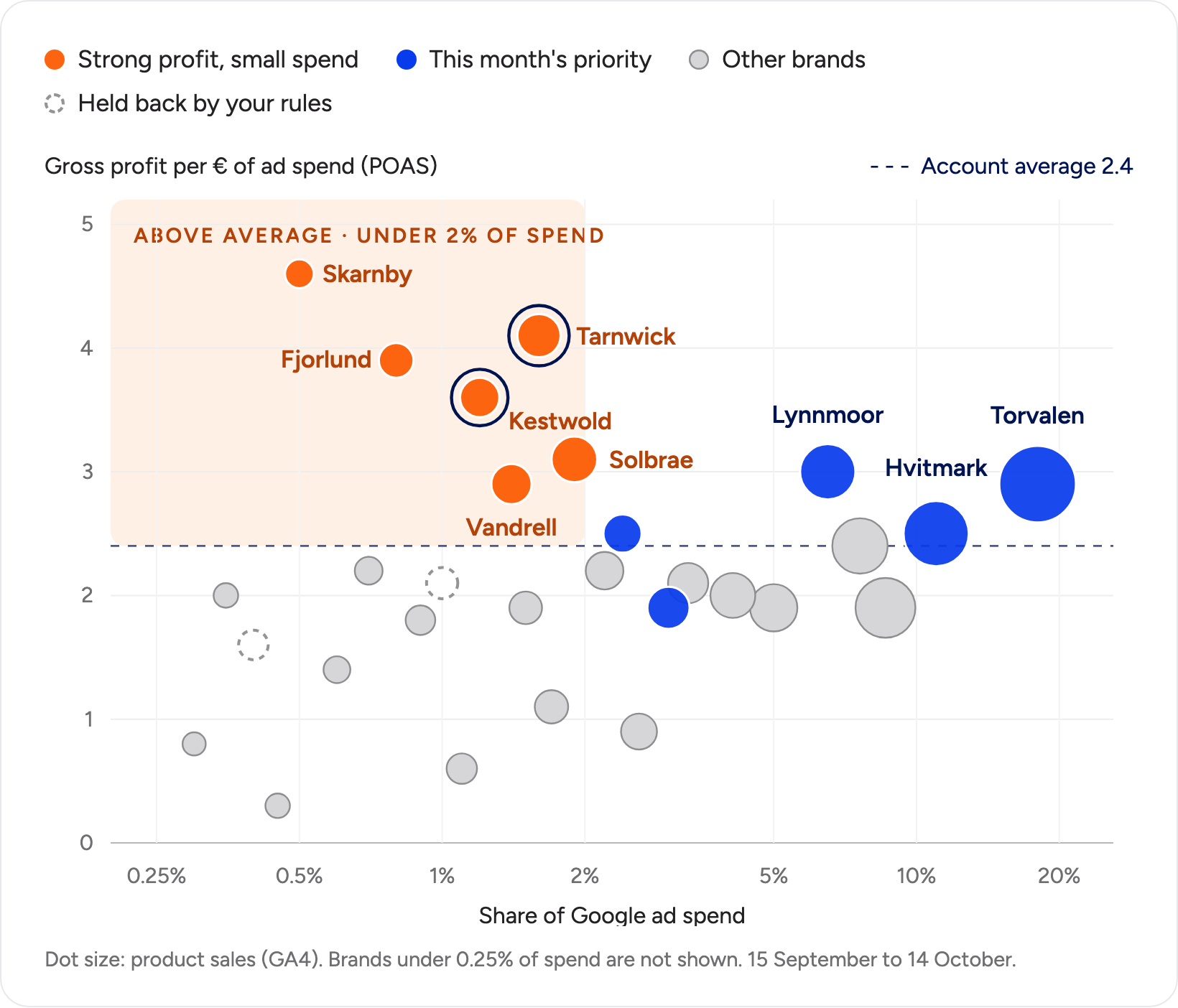
Six brands qualify. Together they bring 10.9% of the gross profit from Google Ads on 7.4% of the spend. The assistant also explains why more spend would not help all of them. One has only 31 of its 66 products in stock, and another has 14 products in total, so a priority change would move very little.
The specialist picks the two clearest cases, Tarnwick and Kestwold. They bring 4.5% of the gross profit on 2.8% of the spend, and 105 of their 119 products are in stock. The specialist asks the assistant to keep them in High while the products are in stock and the margin is at least 35%. The assistant answers with a rule draft and the facts the specialist needs before saying yes.
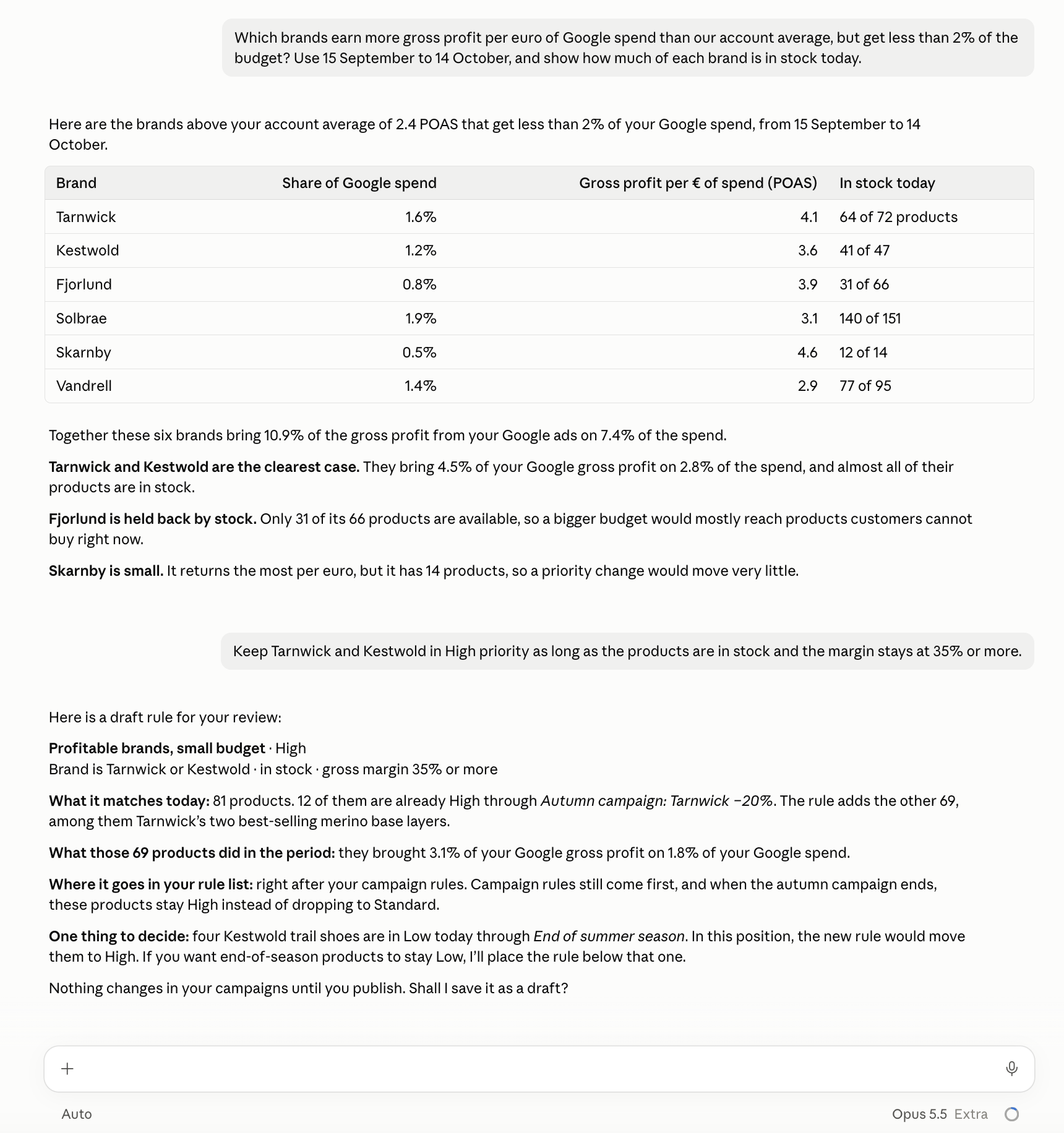
The rule preview also catches a conflict that is easy to miss in a hurry. Four end-of-season trail shoes sit in Low through another rule, and in this position the new rule would move them to High. The specialist decides where the rule goes. Until the rule is published, the campaigns keep running on the current priorities.
12 Things to Ask Expanly MCP
These requests work well as starting points. Each is phrased the way a client or specialist would ask it, and the assistant answers from the client's own data in Expanly.
Understand the Account
- “Where did last month's Google spend go by brand and category, and where did the sales come from?” The assistant puts the share of spend next to the share of sales, so the gaps show at a glance.
- “Which products sell well in the webshop but get almost no Google spend?” Expanly holds GA4 sales and Google Ads cost for each product as separate sources, so the assistant can set webshop sales against Google spend product by product.
- “How much did we spend last week on products that are in Low priority today?” A quick check that the campaign structure treats Low the way the client intended.
You: Which products sell well in the webshop but get almost no Google spend?
Assistant: From 15 September to 14 October, 23 products sold more than €2,000 each in the webshop but got less than €50 each in Google spend. Most are wool socks, beanies and gloves, and 21 of them are in stock today. Ask the client whether these ranges should grow this season before raising their priority.
Find Opportunities and Waste
- “Which brands earn more gross profit per euro of Google spend than the account average, but take a small share of that spend?” The assistant adds up the estimated gross profit of each brand's products, which Expanly calculates from the product costs the retailer sends.
- “Which High products are out of stock today, and which rule put them there?” The assistant checks the matched rule and its stock conditions, so the specialist can see why the product received High.
- “Which products look good on ROAS but earn little once product costs and returns are counted?” The assistant starts from the estimated gross profit per euro of spend, adjusts it with the return rates the retailer sends to Expanly and shows both figures, before and after returns, side by side.
Draft and Test Rules
- “Keep these brands in High while they are in stock and their margin is at least 35%.” The assistant writes the rule, previews what it matches and saves it as a draft.
- “Which products does no rule cover yet?” New ranges often arrive without one. Products that no rule matches get Standard priority until a rule covers them.
- “Move the clearance rule below the promotion rules and show me which products change priority.” Rule order decides which rule wins, and the rule preview shows the products that would move.
Follow Up and Explain
- “What changed in this rule since September, and who changed it?” Rule history shows every version, the person who made each change and whether it came through the MCP.
- “Write a short note for the client's ecommerce manager on which products moved to High this week and why.” The assistant drafts it from the rules and the data, and the specialist edits it before sending.
- “Check all my client workspaces: last week's spend on products currently in Low, products no rule covers, High products out of stock, and whether last night's run finished.” The assistant goes through every workspace the user can access and lists the ones that need attention.
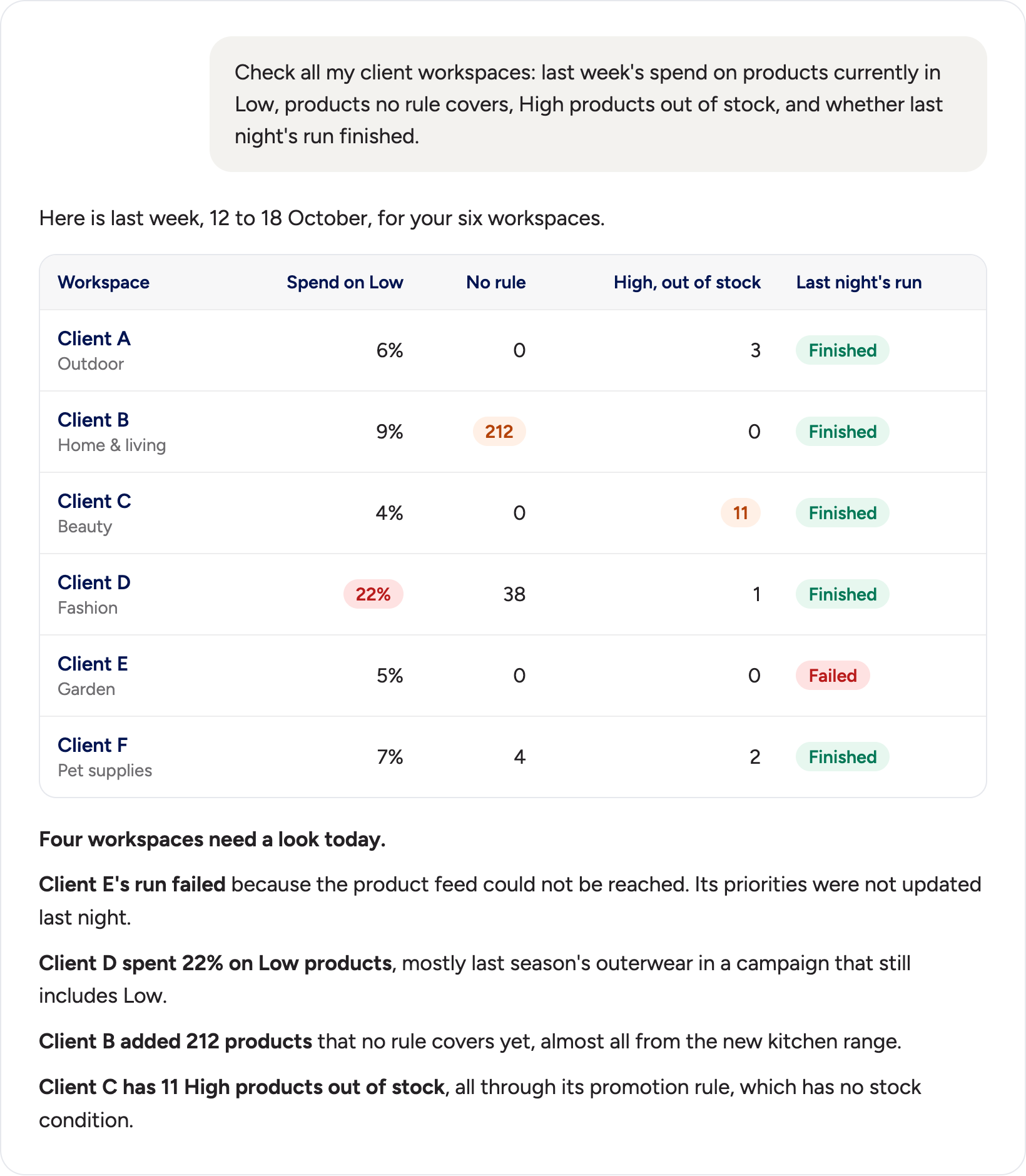
In this example, Client E's run failed because its product feed could not be reached, so its priorities were not updated. Client D put 22% of last week's spend on products that are in Low today, mostly last season's outerwear. Client B added 212 products that no rule covers yet, and Client C has 11 High products out of stock through a promotion rule without a stock condition.
What Stays with People
Expanly MCP gives the assistant the data and the drafting work. People decide how far the assistant can go, and the setup keeps that visible.
The organization owner sets AI access to Off, Read-only or Read and write. Rule changes stay drafts until they are published. With Read and write access, the assistant can also make changes using the signed-in user's edit rights, including publishing, changing settings and deleting data connections. Expanly marks these high-impact tools so the assistant can ask before using them, and we recommend setting the assistant to ask every time.
Expanly records each MCP call with the signed-in user. For rule changes, the rule history also shows who changed what and that the change came through MCP. Connecting data sources, entering credentials and managing users stay in the Expanly web app.
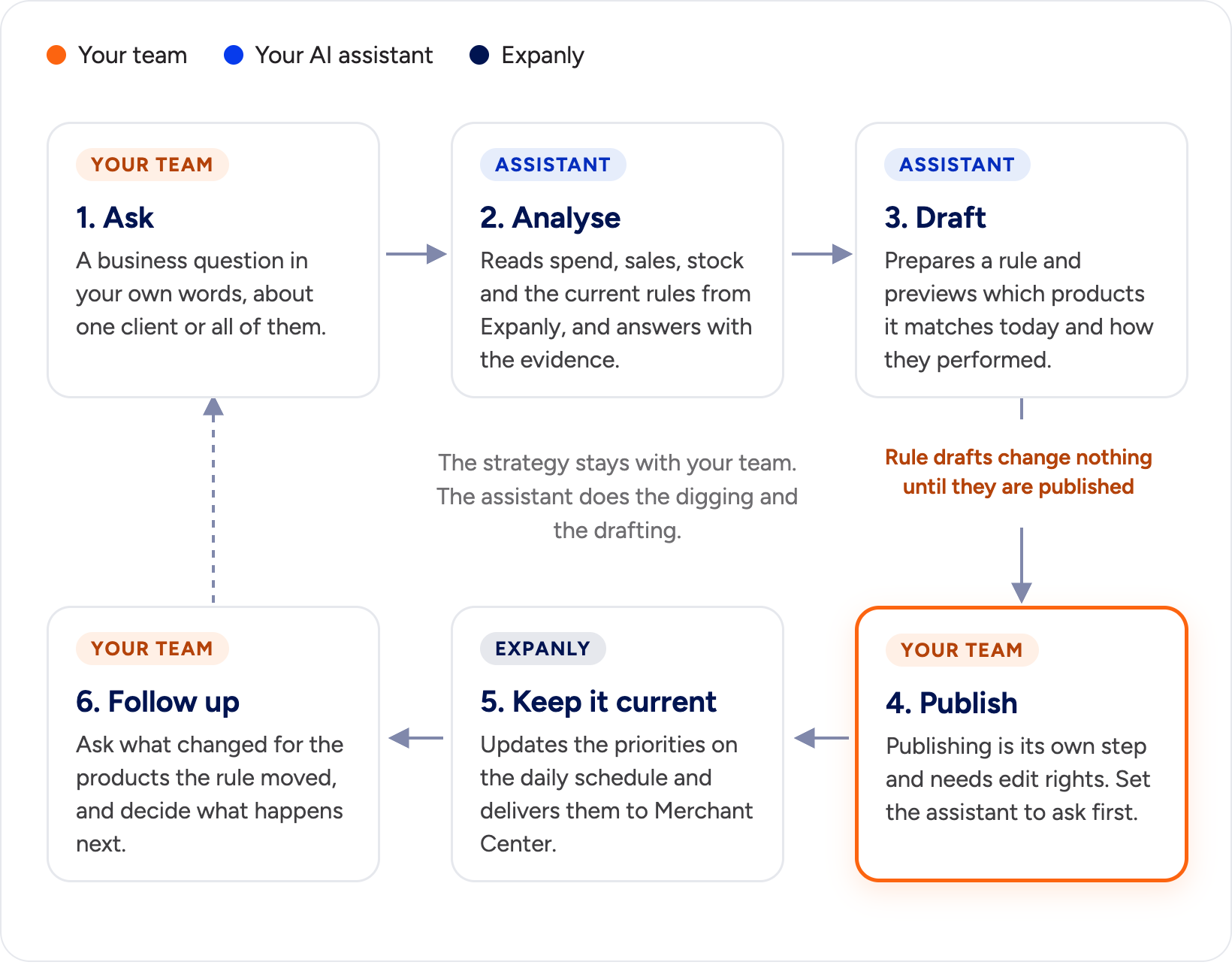
This keeps the agency's role clear. The retailer sets the commercial direction, the specialist turns it into priorities and campaign structure, and the assistant takes over the slow work in between. How Retail Teams and Google Ads Agencies Can Share Product Priorities covers that division of work in more detail.
Preview Access: Who We Are Looking For
Expanly MCP is in preview with selected customers. We are giving access step by step to agencies that run Google Shopping and Performance Max for retailers, and to multi-category retailers with 1,000 or more SKUs and at least €10,000 a month in feed-based advertising spend.
When we offered access to the first agency, the reply came within minutes, together with a question: could a colleague who handles the day-to-day account work have it too? We have seen the same in our own team. Once one person works this way, the others want to.
If you want Expanly MCP for your agency or your store, contact us and tell us which clients or catalog you would start with. We will set up access with you and agree on the first questions to try.